-Cholesterol 1,2,3 - Error 803 or 603...Failure to communicate!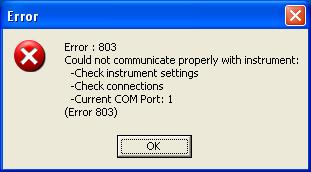
A Cholesterol 1,2,3 user will see this or a similar error if they are not properly set up. There are a number of things that might cause this. If the customer sees this error when opening the Cholesterol 1,2,3 software, check the following -
-
Make sure that all connections are secure. Turn off the PC, unplug the serial connection to the PC and secure it with the thumbscrews. Disconnect and reconnect the power supply. Make sure that there is power going to the instrument...that is, make sure that the outlet is active. Check for power by closing down the measurement shoe and ensure that the instrument illuminates at the point of measurement. Restart the PC and open software.
-
Make sure that the proper power supply is being used. International customers must use the switching SE 30-85 power supply. Manufacturer is PowDec and the customer will need to supply the line cord. A common computer power cord will suffice. Use of the wrong power supply will result in the above error and spectrophotometer will not illuminate.
-
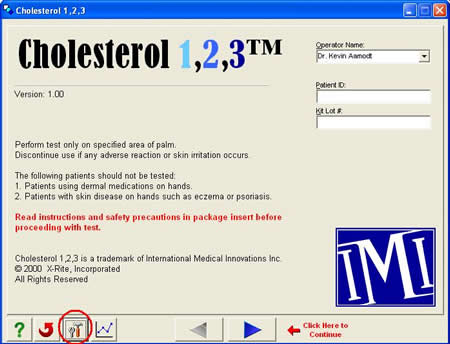
Check the Com Port setting and change to Com Port 2, 3, or 4 if necessary. Do this by selecting "Options" on the software's home screen -
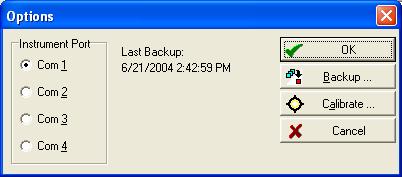
Select another Com Port setting and then select "OK" -
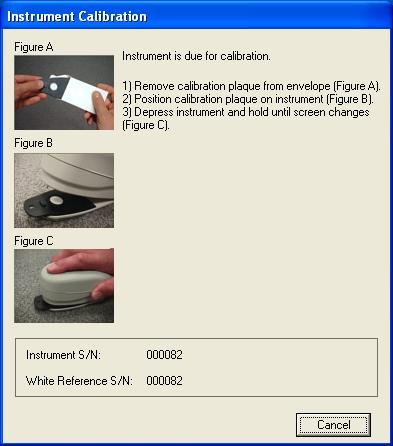
Close the software and try reopening. If the Com Port is properly set, the calibration window will open -
If there is no communication with any of the four Com Port options, then the PC will need to have its Com Ports reconfigured so that the serial port is set up as either Com Port 1, 2, 3, or 4 and the Cholesterol 1,2,3 setting will need to be set to that.
If all connections, power supply, and Com Port settings are correct and the spectrophotometer is still not communicating, contact X-Rite Customer Service at 888-826-3044.